 wahab
wahab 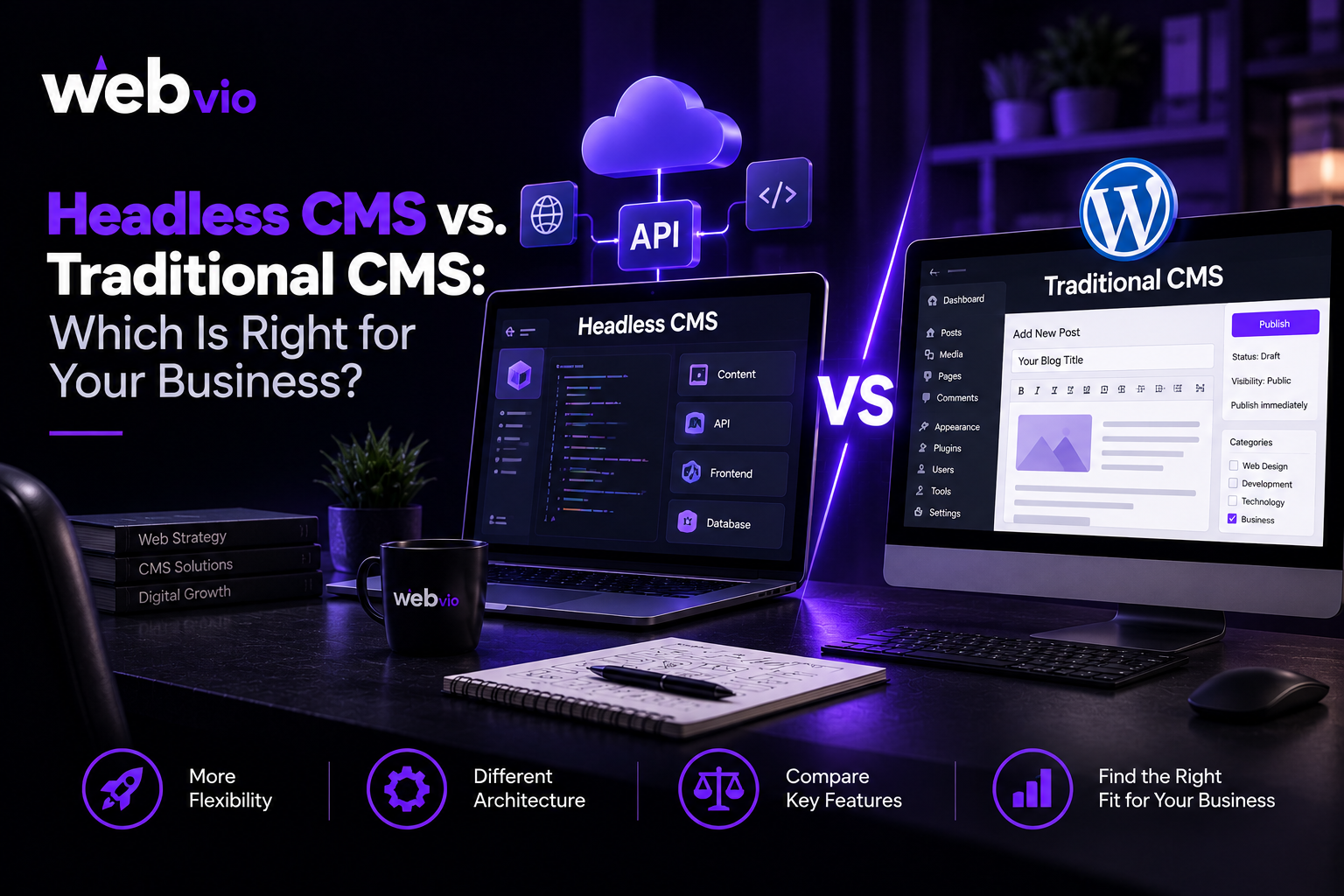
Choosing the right content management system (CMS) can have a lasting impact on how your business manages its website, publishes content, and delivers digital experiences. The platform you choose influences development costs, editing workflows, integrations, website performance, and the resources required to maintain your digital presence.
Two common approaches are traditional content management systems and headless CMS platforms. Both allow businesses to organize and publish content, but they differ in how content is connected to the website’s design and presentation layer.
A traditional CMS often provides an integrated environment for managing content and displaying it on a website. A headless CMS separates the content back end from the front end, allowing developers to deliver content through APIs to different applications.
Neither approach is automatically better. The right choice depends on your business requirements, technical resources, budget, and plans for future growth.
What Is a Traditional CMS?
A traditional CMS combines content management with tools for displaying content on a website. Users can create pages, publish articles, manage media, and often customize layouts through themes, templates, and plugins.
WordPress is a familiar example of a traditional CMS when used with its conventional theme-based presentation system.
This approach can be practical for businesses that need a professional website without building every component from scratch. A company can create service pages, publish blogs, manage navigation, and update website content through a central dashboard.
Traditional CMS platforms may also support custom functionality and integrations. The exact capabilities depend on the platform, theme, plugins, and development work involved.
Key characteristics of a traditional CMS
- Content management and website presentation are closely connected.
- Themes and templates help control page layouts.
- Editors can often publish content without developer assistance.
- Plugins and extensions can add functionality.
- Development and maintenance may be relatively straightforward for conventional websites.
For small businesses, professional services firms, and content-focused websites, this architecture can provide everything needed to manage a digital presence efficiently.
What Is a Headless CMS?
A headless CMS separates content management from the front-end interface that visitors see. Content is stored and organized in the back end, then delivered to websites or applications through APIs.
Developers can build the front end using technologies such as React, Next.js, Vue, or other suitable frameworks. The CMS continues to manage content independently of the interface used to display it.
For example, a business could manage product information, announcements, and educational articles in one content repository. Different applications could then retrieve that information and present it through their own designs.
Key characteristics of a headless CMS
- Content and presentation are separated.
- APIs deliver content to connected applications.
- Developers have more freedom to choose front-end technologies.
- Content can potentially be reused across multiple channels.
- The architecture may require additional development and maintenance expertise.
Headless CMS platforms can be useful for businesses with specialized front-end requirements or multi-channel publishing needs. However, the flexibility comes with additional architectural decisions and responsibilities.
Headless CMS vs. Traditional CMS: Key Differences
Understanding the practical differences makes it easier to choose an architecture that fits your business.
| Factor | Traditional CMS | Headless CMS |
|---|---|---|
| Architecture | Content and presentation are often connected | Content and presentation are separated |
| Setup | Often simpler for conventional websites | May require more planning and development |
| Design flexibility | Depends on themes and customization | Greater freedom over the front end |
| Content delivery | Usually focused on the integrated website | Can deliver content to multiple applications |
| Editing experience | Often familiar and integrated | Depends on the CMS and editorial interface |
| Performance | Can be excellent with proper optimization | Can be excellent with proper rendering and caching |
| SEO | Can support complete SEO workflows | Can support SEO but needs correct front-end implementation |
| Maintenance | CMS, themes, plugins, and hosting | CMS, front end, APIs, and integrations |
| Technical skills | Varies by customization and platform | Often requires stronger development expertise |
| Cost | Can be lower for simpler projects | May involve additional development and infrastructure costs |
These are general comparisons, not guarantees. A heavily customized traditional CMS may be more complex than a straightforward headless implementation, while a poorly configured headless website can introduce significant performance and maintenance challenges.
1. Which CMS Is More Cost-Effective?
Cost is an important consideration when choosing a content management system. However, businesses should compare the total cost of ownership rather than focusing only on the initial development quote.
A traditional CMS can be more affordable for straightforward websites because themes, plugins, and established editing workflows reduce the amount of custom development required.
A headless CMS may require separate front-end development, API integration, hosting arrangements, and additional testing. Depending on the platform, subscription or usage fees may also apply.
However, cost depends on the project’s requirements. A business that already operates several digital channels may benefit from centralizing content management instead of maintaining separate systems.
Before choosing a platform, consider:
- Initial design and development costs
- CMS licensing or subscription fees
- Hosting and infrastructure
- Third-party integrations
- Content migration
- Security and maintenance
- Training and technical support
The most cost-effective option is the one that meets your requirements without creating unnecessary complexity or recurring expenses.
2. Which Approach Offers More Design Flexibility?
Traditional CMS platforms often use themes, templates, and page-building tools to control the website’s appearance. These tools make it easier to build pages quickly and maintain a consistent design.
Customization is still possible, but certain layouts or features may require additional development depending on the theme and platform.
A headless CMS gives developers greater freedom over the presentation layer. They can build a front end around specific user experiences, interactions, and technical requirements without being tied to the CMS’s built-in rendering system.
This can be valuable for businesses that need highly interactive interfaces, custom product experiences, or different front ends for different audiences.
However, greater flexibility does not automatically mean better results. A headless front end still requires thoughtful design, accessibility, responsive layouts, and a manageable content editing process.
3. Which CMS Is Better for SEO?
Both traditional and headless CMS platforms can support effective search engine optimization. Rankings depend on much more than the CMS architecture, including content quality, search intent, website authority, competition, and technical implementation.
Traditional CMS platforms often make common SEO tasks relatively straightforward. Depending on the platform and configuration, users can manage page titles, meta descriptions, URLs, sitemaps, redirects, and other important settings through familiar interfaces.
Headless CMS implementations can also support these requirements, but developers must ensure that the front end correctly handles metadata, page rendering, canonical URLs, structured data, internal links, and indexing controls.
For either architecture, important SEO considerations include:
- Search-friendly URLs
- Editable title tags and meta descriptions
- Clear heading structures
- Crawlable internal links
- Appropriate canonical tags
- Correct robots directives and sitemap configuration
- Mobile usability and page performance
- Relevant structured data where appropriate
If your team publishes content frequently, consider how easily editors can manage SEO fields and preview pages before publication.
A headless architecture can support SEO effectively, but it should not be selected solely because it is assumed to provide better rankings.
4. How Do They Compare in Website Performance?
Website performance depends on how the entire system is designed and maintained.
Traditional CMS websites can achieve strong performance through suitable hosting, efficient themes, image optimization, caching, and careful plugin management. Performance issues can arise when a website relies on excessive scripts, poorly optimized extensions, or inefficient database queries.
Headless CMS websites can use modern rendering techniques, caching, and content delivery strategies to improve responsiveness. However, they may also introduce API dependencies, complex JavaScript bundles, and additional network requests.
The implementation matters more than the architectural label.
Ask your development team how it will measure loading speed, responsiveness, and visual stability. Testing should include realistic devices and network conditions, not just a high-powered development machine.
Both approaches need ongoing monitoring and optimization as content, traffic, and functionality evolve.
5. Which Is Easier for Content Teams to Manage?
Content management is often overlooked when businesses compare technical architectures.
A traditional CMS can provide an integrated workflow for writing, previewing, and publishing website pages. Many editors can manage routine updates without developer assistance, especially when the website uses a well-organized theme and dashboard.
A headless CMS can also provide a user-friendly editorial interface. However, content models need to be planned carefully, and preview or publishing workflows may require additional configuration.
Consider how your team will create service pages, publish blog posts, update images, manage multiple languages, and coordinate approvals.
Ask potential developers to demonstrate these tasks before making a decision. The system should make content management easier rather than introducing unnecessary steps.
6. Which Architecture Is Better for Integrations and Multiple Channels?
A traditional CMS can integrate with many external services through plugins, APIs, and custom development. For businesses operating a conventional website, these options may be sufficient.
A headless CMS is designed to separate content from presentation, making it suitable for delivering structured information to multiple connected applications.
For example, a business may want to publish content across a website, mobile application, customer portal, or digital display system.
A centralized content repository can help reduce duplicated editorial work, although each channel may still require specific formatting, integrations, and functionality.
If your business operates only one relatively simple website, the benefits may not justify the extra complexity. If you manage several digital channels, headless architecture may deserve closer consideration.
7. Security and Ongoing Maintenance
Both approaches require security planning, regular updates, backups, and monitoring.
Traditional CMS websites may need ongoing attention to the CMS core, themes, plugins, hosting environment, and user permissions. Outdated or poorly maintained extensions can introduce vulnerabilities.
A headless CMS separates some components, which can reduce certain risks when implemented correctly. However, it also introduces additional elements to maintain, such as APIs, front-end applications, authentication systems, and integration points.
Before choosing either option, ask who will manage updates, monitor errors, maintain dependencies, and respond to security issues.
Also clarify website ownership, code access, hosting control, documentation, and support arrangements. These factors can have a significant effect on long-term costs and operational independence.
How to Choose the Right CMS for Your Business
The right choice starts with your requirements rather than a preference for a particular technology.
A traditional CMS may be the better fit if you need a conventional business website, a familiar editing workflow, and a manageable development budget.
A headless CMS may be worth considering if your organization needs multiple front ends, specialized integrations, or a content architecture that supports several digital channels.
Before committing, answer these questions:
- Will your content need to appear across multiple platforms?
- Does your website require specialized front-end functionality?
- How important is a simple editorial workflow for your team?
- What technical skills are available internally?
- What are the initial and ongoing costs?
- How will the website need to evolve over the next few years?
If a headless architecture appears suitable, explore Headless CMS Development Services to understand the development and integration requirements for your project.
Final Thoughts
Headless CMS and traditional CMS platforms solve similar content management problems through different architectural approaches.
A traditional CMS can provide an efficient, practical solution for many business websites. A headless CMS offers greater separation between content and presentation, which can be valuable for organizations with multi-channel publishing needs or specialized front-end requirements.
Neither approach guarantees better performance, security, SEO, or scalability. These outcomes depend on the platform, implementation, and ongoing maintenance.
Define your business objectives, assess your technical resources, and compare the total cost of ownership before choosing a solution. The best CMS is the one that supports your content strategy and customer experience without introducing unnecessary complexity.
If you are planning a website upgrade or evaluating modern content management options, Webvio Design can be a starting point for exploring web development solutions that fit your business needs.
Frequently Asked Questions
What is the main difference between a headless CMS and a traditional CMS?
A traditional CMS often combines content management with website presentation, while a headless CMS separates the content back end from the front end and delivers content through APIs.
Is a headless CMS better for SEO?
Not automatically. Both architectures can support SEO when metadata, page rendering, crawlability, internal links, performance, and content quality are handled correctly.
Is a traditional CMS suitable for a growing business?
Yes. Many traditional CMS platforms support growing websites through themes, plugins, integrations, and custom development. The important question is whether the platform can meet your future requirements.
Does a headless CMS cost more?
It can involve higher development and maintenance costs because of separate front-end applications, API integrations, and infrastructure. The total cost depends on project complexity and platform pricing.
Can a headless CMS work with WordPress?
Yes. WordPress can be used as a headless content back end, with a separate front end retrieving content through APIs. This approach requires additional development and maintenance.
How do I decide which CMS is right for my business?
Evaluate your website requirements, content workflow, integrations, technical resources, budget, and future plans. Choose the architecture that solves your actual needs with the least unnecessary complexity.